
trylittlenap.com/baby-nap-tracker
Baby Nap Tracker
A baby nap tracker records each daytime sleep so you can see length, timing, and how long baby has been awake since the last nap. Little Nap is a baby nap tracker for iPhone: one tap starts the nap, one tap ends it, and the same screen can log a diaper or feeding. After a few naps, Premium can estimate the next nap window from that personal rhythm.
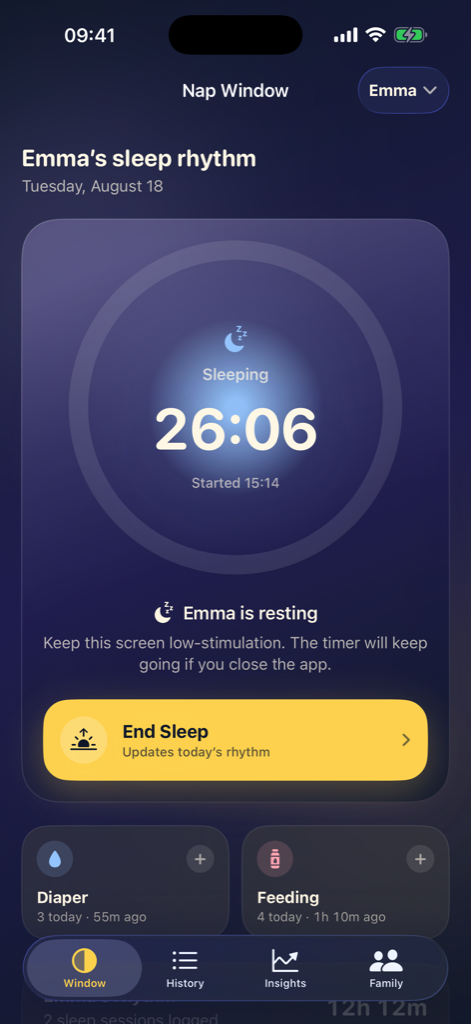
How to track baby naps without rebuilding the day later
Why nap tracking is different from night sleep
Naps are shorter, more frequent, and easier to forget than overnight sleep. A 12-minute catnap and a 90-minute nap can look the same in memory by evening. Parents also need the gap after a nap — the wake window — more than they need a perfect weekly average.
Little Nap treats naps as timed sessions. The home screen shows awake time after a nap ends, so the next decision is about the current stretch, not a reconstructed schedule. Night sleep uses the same one-tap timer, which keeps the log consistent when a late nap slides into bedtime.
What to log in a baby nap tracker
The useful fields are start time, end time, and whether the sleep was a nap or night sleep. Little Nap captures those with the timer. You can also add a recent nap from History if you remembered the times after the fact.
Diapers and feedings next to naps help when someone asks whether baby last ate before or after the last sleep. That context is often what a partner or grandparent needs, not a clinical chart.
- Start and stop the nap timer from the Nap Window screen
- Watch the Lock Screen timer without unlocking
- Add a missed nap later from History
- Keep twins on separate timers so one nap does not overwrite the other
How Little Nap turns naps into a next-window estimate
Little Nap blends age-based wake ranges with the median wake time from recent personal logs. A short nap can pull the next window earlier. A nap that would finish too close to bedtime can be treated more carefully so the suggestion does not crowd the night.
Confidence rises as more valid sleeps are logged. Early days lean on age. After several sleeps, the personal rhythm carries more of the estimate. Premium shows the window as a time range such as “Start nap between 15:39–15:59,” plus a confidence percentage and a short explanation of why that window opened.
How to use a nap tracker without turning it into homework
Log the sleeps you can. A complete week is better than a perfect week. Little Nap is designed for tired hands: the timer is the main action, and care events are quick adds rather than forms.
If a day is messy, the 7-day graph still shows the shape. That shape is often enough to notice that naps are drifting later, getting shorter, or clustering after feeds. The app will not score your parenting.
- Start a nap
- One tap when eyes close
- End a nap
- One tap when baby wakes
- Free history
- Swipe any day in the calendar
Baby Nap Tracker questions
What is a baby nap tracker?
A baby nap tracker records daytime sleeps so you can see nap length, timing, and time awake since the last nap. Little Nap does this with a one-tap timer on iPhone.
Can I track a nap I forgot to start?
Yes. Little Nap lets you add a recent nap from History when you remember the times, so a missed start does not erase the day.
Does Little Nap separate naps from night sleep?
Yes. You can log a nap or night sleep with the same timer. Keeping the type clear helps history and nap-window estimates stay readable.
Do I need Premium to track naps?
No. Nap logging, history, and the 7-day graph are free. Premium adds predicted next-nap windows, confidence, and explanations.
Little Nap provides estimated sleep tracking and rhythm guidance. It is not medical advice, diagnosis, or treatment. Contact a qualified clinician for health concerns.
Use Little Nap for baby nap tracker
Free logging and a 7-day graph on iPhone. Premium adds predicted windows and family sharing.
Download on the App StoreOther Little Nap microsites
- trylittlenap.com/predicted-nap-windows Predicted Nap Windows Clock-range nap suggestions with confidence, from age plus your logs.
- trylittlenap.com/wake-windows-by-age Wake Windows by Age Age-based wake ranges Little Nap uses before personal logs take over.
- trylittlenap.com/baby-sleep-tracker Baby Sleep Tracker Log naps, nights, diapers, and feedings in one private iOS app.